


ID: 100027622
VB-WPS-001 - Wireless
OEM Number
EAN
766907007275
This product is discontinued
Unfortunately, the product is out of stock.
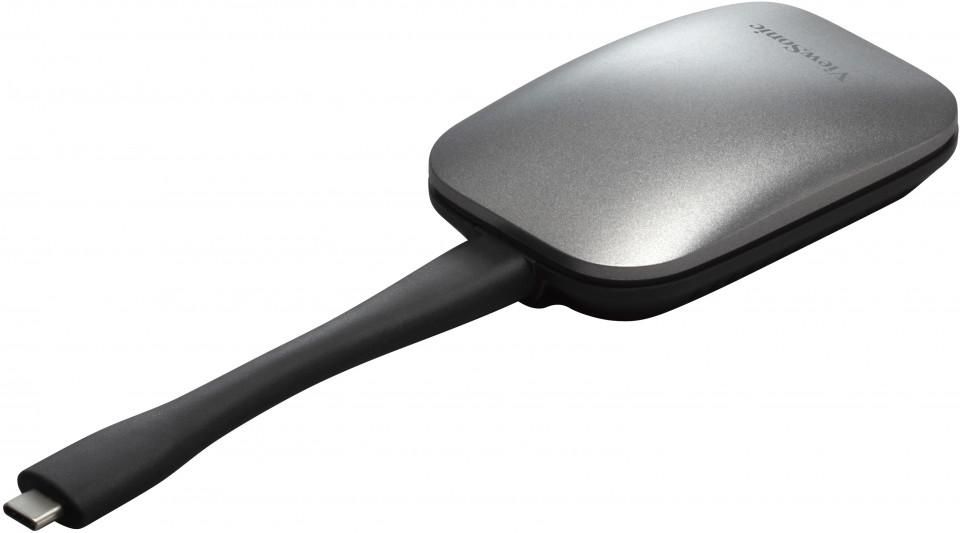
The ViewSonic ViewBoard Cast Button is an easy-to-use USB-C screen sharing device. It enables 1080p content to be streamed from a user’s PC onto a ViewBoard® interactive display over wireless or cable networks. Just pair the button with your devices, click the button and begin sharing content. Cross-platform support for Windows, MacOS, Chrome OS and Linux delivers convenience and versatility. Easy USB-C connectivity enables video, audio and power transmission over a single cable. Dual-band WiFi support ensures blazing-fast wireless network speed, and the built-in WPA2 PSK encryption ensures a secure connection. Whether used in conference rooms or huddle spaces, the ViewBoard Cast Button makes group collaboration quick and easy.
Instant sync with a click
With just one click, cast your screen and share your content from your laptop to the ViewBoard®/Wireless Presentation Display with ease. The ViewBoard® Cast Button eliminates the need to install or download additional software, giving you more time to brainstorm and fewer syncing worries.
Uninterrupted connectivity
Connect the ViewBoard® Cast Button and your device via the HDMI or USB-C cable, and you can showcase videos of superior clarity without fuss. You can focus on acing your presentation as the Cast Button gets powered at the same time.*Note:VB-WPS-001 with USB Type-C connector; VB-WPS-003 with HDMI Connector.
Superior compatibility
Compatible with various operating systems(Windows, Mac and Chrome OS), the ViewBoard® Cast Button lets you participate and present from your preferred device without hassle.
Optimize your meetings
Make your wireless meetings and presentations more effective and efficient with a single tap. The ViewBoard® Cast Button allows up to 4 persons to present on a ViewBoard®/Wireless Presentation Display at once, giving everyone the ability to participate and present.
Enhance your presentations
The ViewBoard® Cast Button helps you manage and streamline meetings better. Add notes and save presentations directly on the ViewBoard® Interactive Display. Move from PowerPoint to YouTube seamlessly without switching devices. Meetings will now be a breeze for everyone.
Uncompromising security and privacy
Elevate collaboration and content-sharing without risking cybersecurity. With ViewBoard® Cast Button, there is no need to connect to your company’s network or install external software. Secured with WPA2-PSK encryption, simply plug it into your device and share data safely and seamlessly.
Instant sync with a click
With just one click, cast your screen and share your content from your laptop to the ViewBoard®/Wireless Presentation Display with ease. The ViewBoard® Cast Button eliminates the need to install or download additional software, giving you more time to brainstorm and fewer syncing worries.
Uninterrupted connectivity
Connect the ViewBoard® Cast Button and your device via the HDMI or USB-C cable, and you can showcase videos of superior clarity without fuss. You can focus on acing your presentation as the Cast Button gets powered at the same time.*Note:VB-WPS-001 with USB Type-C connector; VB-WPS-003 with HDMI Connector.
Superior compatibility
Compatible with various operating systems(Windows, Mac and Chrome OS), the ViewBoard® Cast Button lets you participate and present from your preferred device without hassle.
Optimize your meetings
Make your wireless meetings and presentations more effective and efficient with a single tap. The ViewBoard® Cast Button allows up to 4 persons to present on a ViewBoard®/Wireless Presentation Display at once, giving everyone the ability to participate and present.
Enhance your presentations
The ViewBoard® Cast Button helps you manage and streamline meetings better. Add notes and save presentations directly on the ViewBoard® Interactive Display. Move from PowerPoint to YouTube seamlessly without switching devices. Meetings will now be a breeze for everyone.
Uncompromising security and privacy
Elevate collaboration and content-sharing without risking cybersecurity. With ViewBoard® Cast Button, there is no need to connect to your company’s network or install external software. Secured with WPA2-PSK encryption, simply plug it into your device and share data safely and seamlessly.
Recommended products

ViewSonic / MPN: CDE5531-1C
CDE5331-1C, 55", ProAV
Price on request

ViewSonic / MPN: IFP7550-5F
IFP7550-5F - 75", 4K UHD
Price on request

ViewSonic / MPN: IFP86G1
IFP86G1, 86" 40 Point Touch,
Price on request

ViewSonic / MPN: VA2432-MHD-3
VA2432-MHD-3, 24" 169 (23.8")
Price on request

ViewSonic / MPN: VSB050
VSB050, Wireles Adapter for
Price on request

ViewSonic / MPN: VS20995
Проектор LSD500HD (Laser, FHD,5500ALm,3000000:1,HD MI*2, USB, RS232, RJ45, 1.13-1.47:1(1.3), 20/30, 1 LSD500HD
Price on request
