


ID: 100031407
iSlack EVO
OEM Number
EAN
5350551999915
Unfortunately, the product is out of stock.
Estimated price
660 Kč
Want to fix your smartphone, tablet or notebook? During the repair of your device one annoying issue often pops up: The display is glued shut or does not have any entry point for a normal opening tool. In these cases, a suction cup is generally recommended. However, it involves the risk of damaging display cables or internal components if too much force is used.
Easily open smartphones and Co.
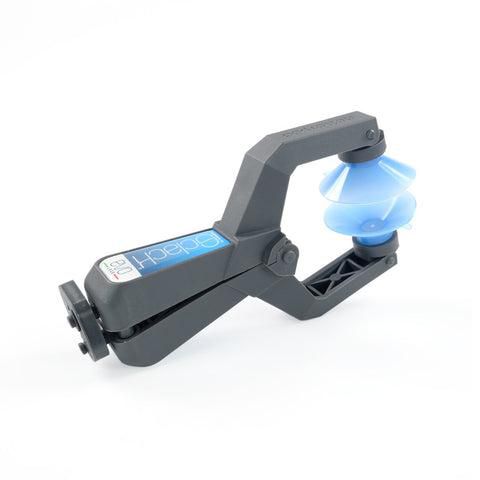
Enter the iSclack EVO: With this handy tool, you can separate the display from the case without any trouble. Originally, the first iSclack was designed for the iPhone 5, however, it is just as useful for the more recent models from Apple (iPhone 5 to iPhone 13) as well as devices from other manufacturers, such as the Samsung Galaxy series, Sony Xperia and many more.
Of course, the use of the iSclack EVO isn’t limited to smartphones only, it works just as well for opening tablets or notebooks. It is only important to have two smooth surfaces opposite one another and that the device fits between the suction cups. Don’t let yourself be held back by glued or clipped displays, repair is always better than buying new.
How it works
Using the iSclack EVO is super simple. After removing any screws, position the suction cups of the tool on the front and back of your device. Squeeze the handle of the iSclack EVO and lock it in one of the two positions. This leaves your hands free to heat the device at the same time and loosen the adhesive even more easily.
The resulting leverage makes it easy to separate the display from the case. The evenly distributed forces ensure that you won't damage any components. Your smartphone is now open and ready for repair.
NOTE
The color of the suction cups on the iSclack EVO you receive can differ from the color in the product photos.
Easily open smartphones and Co.
Enter the iSclack EVO: With this handy tool, you can separate the display from the case without any trouble. Originally, the first iSclack was designed for the iPhone 5, however, it is just as useful for the more recent models from Apple (iPhone 5 to iPhone 13) as well as devices from other manufacturers, such as the Samsung Galaxy series, Sony Xperia and many more.
Of course, the use of the iSclack EVO isn’t limited to smartphones only, it works just as well for opening tablets or notebooks. It is only important to have two smooth surfaces opposite one another and that the device fits between the suction cups. Don’t let yourself be held back by glued or clipped displays, repair is always better than buying new.
How it works
Using the iSclack EVO is super simple. After removing any screws, position the suction cups of the tool on the front and back of your device. Squeeze the handle of the iSclack EVO and lock it in one of the two positions. This leaves your hands free to heat the device at the same time and loosen the adhesive even more easily.
The resulting leverage makes it easy to separate the display from the case. The evenly distributed forces ensure that you won't damage any components. Your smartphone is now open and ready for repair.
NOTE
The color of the suction cups on the iSclack EVO you receive can differ from the color in the product photos.
Recommended products

iFixit / MPN: EU145219-4
iMac Opening Wheel
171 Kč

iFixit / MPN: IF145-548-1
Mandible Flush Cutters
343 Kč

iFixit / MPN: EU145392-1
Manta Driver Kit (112 Bits)
1 502 Kč

iFixit / MPN: IF145-552-1
Narwhal 6-In-1 Screwdriver
429 Kč

iFixit / MPN: EU145334-1
Spudger 3 Pack
171 Kč

iFixit / MPN: IF145-348-5
Essential Electronics Toolkit / v2.2, IF145-348-5
Price on request
You also viewed
Go to catalog →

Compulocks / MPN: 510APXB
Apex MS Surface GO 1-4 Gen
Price on request

Duracell / MPN: 176768
Plus Single-Use Battery Aaa
Price on request

Samsung / MPN: BA44-00295A
ADAPTOR AD-4019A, 19VDC,2.1A
Price on request

Lindy / MPN: 43325
4 Port Usb 3.2 Type C Hub
Price on request

HP / MPN: 9C2F6AA
510 Ultra-Fast Rechargeable
Price on request

OKI / MPN: 45856101
Frame Assy Hopping (ADF)
Price on request