


ID: 100027610
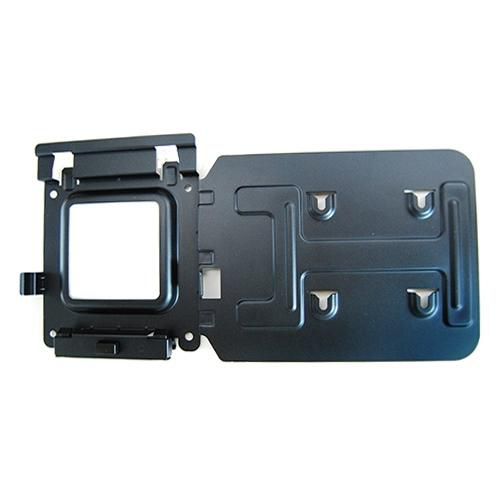
Bracket Mounting Kit
OEM Number
EAN
5704174313175
In stock: 20-49
Delivery: 2–4 weeks
Easily mount your Dell™ Dock-WD15 or Dell Thunderbolt Dock-TB15 behind most Dell UltraSharp or P-Series monitors or to a wall, desk, or any flat surface with the Dell Docking Station Mounting Kit. Help create a clutter-free work environment at your desk or workstation by mounting your Dell Dock-WD15 or Dell Thunderbolt Dock-TB15 behind your compatible monitor or under your desk.
The kit comes with everything that you need to mount your Dell Dock-WD15 or Dell Thunderbolt Dock-TB15 behind a compatible Dell UltraSharp or P-Series monitor . The bracket easily attaches with four included mounting screws to the VESA mounting holes (100mm) underneath the monitor stand connector. Stand should be removed to attach the bracket, and then reattached to the bracket once the bracket is secured to the monitor. Mounting position for the Dell Dock-WD15 or Dell Thunderbolt Dock-TB15 will be offset to the side of the stand. Two included mounting screws are screwed into the bottom of your dock, which then allows it to slide easily onto the mounting bracket. It can easily be removed when needed. The kit can also be used to mount your Dell Dock-WD15 or Dell Thunderbolt Dock-TB15 on a wall, under a desk, or onto a table (with included mounting hardware). Two included mounting screws are screwed into the bottom of your dock, which then allows it to slide easily onto the mounting bracket. It can easily be removed when needed.
The kit comes with everything that you need to mount your Dell Dock-WD15 or Dell Thunderbolt Dock-TB15 behind a compatible Dell UltraSharp or P-Series monitor . The bracket easily attaches with four included mounting screws to the VESA mounting holes (100mm) underneath the monitor stand connector. Stand should be removed to attach the bracket, and then reattached to the bracket once the bracket is secured to the monitor. Mounting position for the Dell Dock-WD15 or Dell Thunderbolt Dock-TB15 will be offset to the side of the stand. Two included mounting screws are screwed into the bottom of your dock, which then allows it to slide easily onto the mounting bracket. It can easily be removed when needed. The kit can also be used to mount your Dell Dock-WD15 or Dell Thunderbolt Dock-TB15 on a wall, under a desk, or onto a table (with included mounting hardware). Two included mounting screws are screwed into the bottom of your dock, which then allows it to slide easily onto the mounting bracket. It can easily be removed when needed.
Recommended products

Dell / MPN: HV8G2
101-key keyboard with palm
Price on request

Dell / MPN: 407-BCBE
10GbE SFP+ SR optical
Price on request
Dell / MPN: 400-BBFP-RFB
1.2tb 10000rpm Sas12gbps 512n
Price on request
Dell / MPN: 450-AHFC
130W AC adapter for laptops,
Price on request

Dell / MPN: X7329
130W AC adapter with 3-pin
Price on request
Dell / MPN: 4TPNY
130W USB-C GaN Slim Adapter
Price on request
You also viewed
Go to catalog →

Xerox / MPN: 497K18121
Multi Card Reader Common
Price on request

MicroConnect / MPN: FIB332010-4
Fiber Patch Cable -
Price on request

Epson / MPN: 2118944
Lamp Unit Assy.
Price on request
Dell / MPN: 1218C
128MB DIMM memory module,
Price on request

MicroConnect / MPN: FIB881001
Fiber Patch Cable -
Price on request

Konica / MPN: A8K4102000
Lifting Block
Price on request